Continuous Float Increase (CFI)
The Continuous Float Increase (CFI) system automatically adjusts float limits based on user behavior, subscription activity, and account metrics. CFI-enabled users can increase their float amount as they demonstrate responsible borrowing and subscription patterns.
Overview
CFI evaluates eligibility for float limit adjustments using a comprehensive scoring system called ranks:
-
Float Rank: Measures historical float repayment behavior
-
Subscription Rank: Measures completed subscription payments
-
Float Amount: Current maximum float tier ($20, $30, $40, $50, $80, $100, $200)
The system uses a decision table (IncreaseChecks) to determine if a user qualifies for a higher float tier based on their combined metrics.
How CFI Works
Three Core Metrics
- Float Rank (0-8)
-
Represents the user’s float repayment history. Created when a user takes a float, incremented when they repay successfully.
- Rank progression
-
-
Rank 0 = No float history
-
Rank 1-2 = Early stage (1-2 floats repaid)
-
Rank 3-4 = Developing (3-4 floats repaid)
-
Rank 5-6 = Established (5-6 floats repaid)
-
Rank 7-8 = Expert (7+ floats repaid)
-
- Subscription Rank (0-8)
-
Represents completed subscription payments. Subscription programs are recurring weekly payments, typically $15-$30 per week.
- Rank progression
-
-
Rank 0 = No subscriptions or paused/cancelled
-
Rank 1-2 = 1-2 completed subscriptions
-
Rank 3-4 = 3-4+ completed subscriptions
-
Rank 5-6 = Multiple active subscriptions over time
-
Rank 7-8 = Consistent subscription history
-
- Account Balance
-
Current available account balance, required at certain tiers:
-
$0 - Basic tier requirement
-
$900 - Intermediate tier ($30-$40)
-
$1,500 - Advanced tier ($50)
-
$2,000 - Premium tier ($80-$100)
-
Eligibility Decision Process
┌────────────────────────────────────────────┐
│  Check Float Limit Eligibility             │
└─────────────────┬──────────────────────────┘
                  │
                  ▼
        ┌─────────────────────┐
        │ Is CFI Enabled?     │
        └────┬────────────────┘
             │
        ┌────┴────┐
        │          │
       YES         NO
        │          │
        ▼          ▼
   ┌──────────┐  ┌──────────────────┐
   │ Gather   │  │ Check if limit   │
   │ user     │  │ qualifies for    │
   │ metrics  │  │ increase         │
   │ • Ranks  │  │ (allow decrease) │
   │ • Balance│  └────┬─────────────┘
   │ • Prev   │       │
   │  Float   │       ▼
   └────┬─────┘  [Continue with
        │         current limit]
        ▼
   ┌──────────────────────────┐
   │ Search IncreaseChecks    │
   │ table (reverse order):   │
   │ Find first match where   │
   │ all criteria met:        │
   │ • MinSubRank ≤ user's    │
   │ • MinFloatRank ≤ user's  │
   │ • MinBalance ≤ balance   │
   │ • MinPreviousFloat ≤     │
   │   highest float taken    │
   └────┬─────────────────────┘
        │
        ▼
   ┌──────────────────────┐
   │ Match Found?         │
   └────┬─────────────────┘
        │
   ┌────┴────┐
   │          │
  YES         NO
   │          │
   ▼          ▼
[New     [No Increase
Float]   Available]
   │
   ▼
┌─────────────────────────┐
│ Compare to current      │
│ float limit:            │
│ • Increase?  Save new   │
│ • Decrease?  Check if   │
│             allowed     │
│ • No change? Skip       │
└────┬────────────────────┘
     │
     ▼
┌─────────────────────────┐
│ Save new float profile  │
│ Send notification event │
└─────────────────────────┘
Detailed Decision Flowchart
The following diagram shows the complete CFI eligibility check algorithm with all decision points and outcomes:
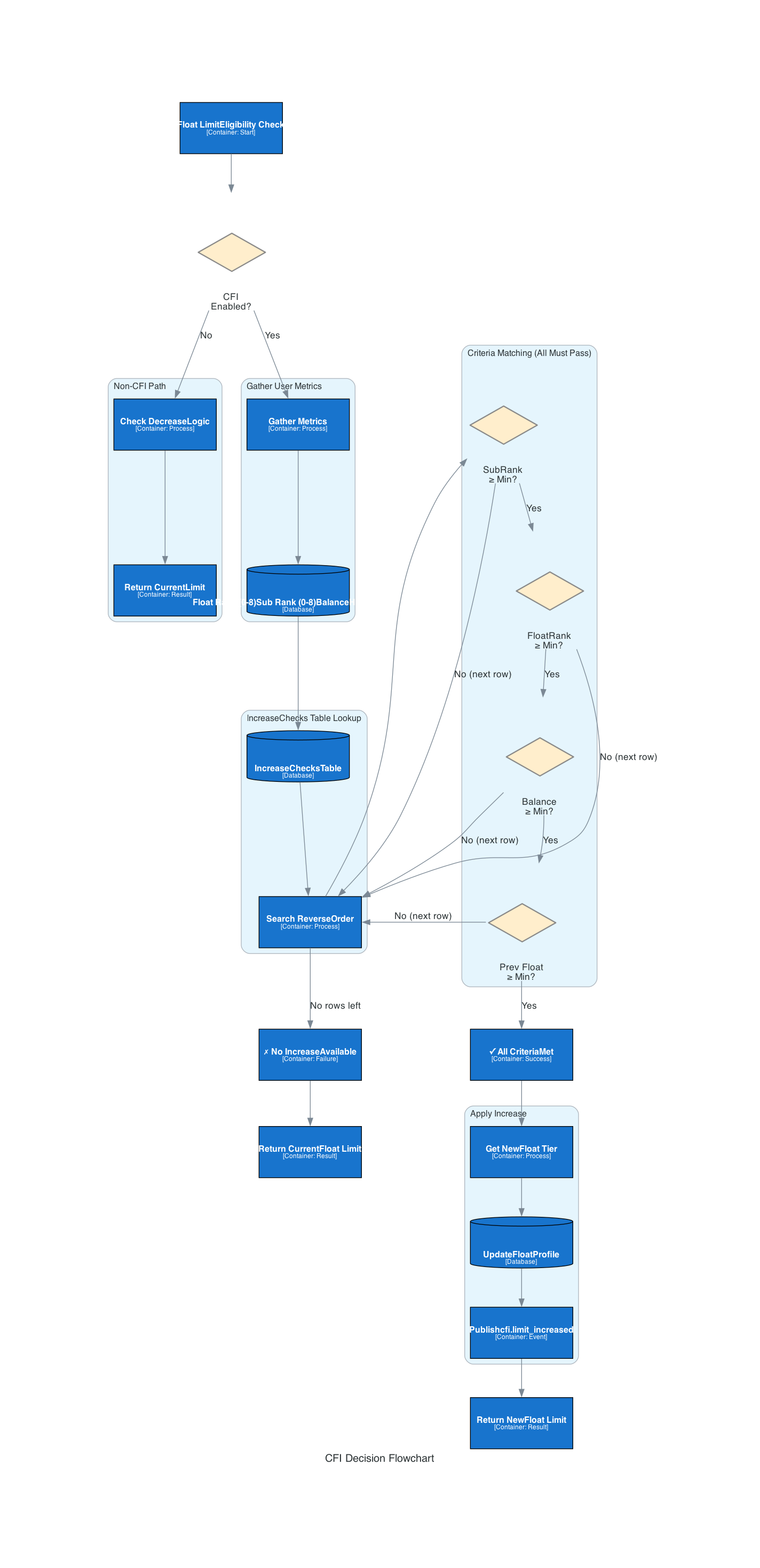
The flowchart illustrates:
-
CFI Enablement Check - First determines if CFI is enabled for the user
-
Metrics Gathering - Collects Float Rank (0-8), Subscription Rank (0-8), Account Balance, and Highest Float Taken
-
IncreaseChecks Lookup - Searches the decision table in reverse order (highest tier first)
-
Criteria Matching - All four criteria must pass: SubRank, FloatRank, Balance, Previous Float
-
Profile Update - On success, updates FloatProfile and publishes
cfi.limit_increasedevent
Eligibility Tiers
The IncreaseChecks table defines all possible float tiers and their requirements:
Tier Requirements (in order of precedence)
| Float Amount | Min Sub Rank | Min Float Rank | Min Balance | Min Previous Float | Special Rules |
|---|---|---|---|---|---|
$20 |
0 |
0 |
$0 |
$0 |
Default tier - For paused users (sub rank 0) |
$20 |
1 |
0 |
$0 |
$0 |
Base tier - New users with 1 subscription |
$30 |
2 |
3 |
$0 |
$20 |
Requires 2+ subs AND 3+ float history |
$30 |
3 |
0 |
$0 |
$0 |
Quick path - 3+ subscription rank only |
$30 |
1 |
0 |
$0 |
$0 |
EWA special - 1 loan + 1 repaid + sub rank 1 |
$40 |
4 |
0 |
$0 |
$0 |
Mid-tier - 4+ subscription rank |
$50 |
6 |
3 |
$0 |
$40 |
Advanced - 6+ subs AND 3+ float history + prev $40 |
$50 |
7 |
0 |
$0 |
$0 |
Premium path - 7+ subscription rank |
$50 |
1 |
0 |
$0 |
$0 |
EWA special - 4 loans + 4 repaid + high subs |
$50 |
1 |
0 |
$1,500 |
$0 |
High balance path - $1,500+ balance only |
$50 |
1 |
1+ |
$0 |
$0 |
Reactivator - Has float history + paid subs (within 6mo) |
$80 |
8 |
6 |
$2,000 |
$50 |
Premium tier - 8 subs + 6 float history + $2,000 balance |
$100 |
8 |
6 |
$2,000 |
$75 |
Elite tier - Like $80 but with $75 previous float |
$200 |
8 |
6 |
$0 |
$200 |
Exclusive - Only for users who repaid a $200 float |
Special Rules
- Reactivators
-
Users who have been dormant and return to the platform within the last 6 months.
-
May qualify for $50 float even at lower ranks if they have float history
-
Paid subscriptions are counted excluding their reactivation month
-
Requires feature flag to be enabled
-
- EWA (Earned Wage Access) Users
-
Users who use external loan products alongside Float.
-
RuleAgeEWALoanCount checks for external loans taken
-
RuleAgeEWARepaidCount checks for external loans repaid
-
Can qualify for $30 or $50 even at rank 1 if meeting EWA thresholds (1+ or 4+)
-
- Non-CFI Users
-
Users with CFIEnabled = false will:
-
Not decrease their current float limit
-
Not increase beyond their existing tier
-
Only maintain their current approved amount
-
Subscription Counting and Period Exclusions
When evaluating MinSubRank thresholds, the system counts completed subscriptions using configurable options:
Counting Rules
- All subscriptions counted must be
-
-
Status = "COMPLETED"
-
CompletionDate within the last 6 months
-
- If user is reactivating (returned within 6 months)
-
-
Exclude subscriptions from their reactivation month
-
Example: User reactivated March 2, 2024. Count subscriptions from September 2023 to March 2024, but exclude any completed in March
-
Example Scenarios
Scenario 1: Standard User Path
Float Rank: 3 (taken 3 floats, repaid all)
Sub Rank: 2 (completed 2 subscriptions)
Account Balance: $1,200
Previous Float: $20 taken before

Evaluation:
1. Check $20: Sub Rank 1 met ✓, Float Rank 0 met ✓ → Eligible
2. Check $30: Sub Rank 2 met ✓, Float Rank 3 met ✓, Prev $20 met ✓ → Eligible
3. Check $40: Sub Rank 4 met ✗ → Not eligible

Result: Approved for $30 (highest tier met)
Scenario 2: Reactivating User
Float Rank: 1 (never took a float, but historical float rank=1)
Sub Rank: 1 (has 1 completed subscription)
IsReactivatingUser: true (returned 2 months ago)
Feature Flag: enabled

Evaluation:
1. Standard checks fail (too low ranks)
2. Check "$50 Reactivator":
   - Sub Rank 1 met ✓
   - Float Rank 1 met ✓
   - Is Reactivator true ✓
   - Feature flag true ✓

Result: Approved for $50 (reactivator path)
Scenario 3: EWA User
Float Rank: 0 (no float history)
Sub Rank: 1 (has 1 subscription, just started)
EWA Borrow Count: 4 (has taken 4 loans)
EWA Repaid Count: 4 (has repaid all 4)

Evaluation:
1. Check "$50 EWA":
   - Sub Rank 1 met ✓
   - Float Rank 0 met ✓
   - Min EWA Borrow Count 4 met ✓
   - Min EWA Repaid Count 4 met ✓

Result: Approved for $50 (EWA path)
Float Limit Changes
When the system determines a new float limit:
- Increasing Limits
-
-
User qualifies for higher tier
-
New float profile saved with higher amount
-
Notification event sent:
"increased": true -
Datadog metric:
underwriting.cfi.limit.increased -
Segment event:
underwriting_float_limit_updatedwith details
-
- Decreasing Limits
-
-
Only happens for CFI-enabled users if they fall below qualification threshold
-
Non-CFI users maintain current limit even if metrics decline
-
Notification event sent:
"increased": false -
Datadog metric:
underwriting.cfi.limit.decreased -
Typically occurs if subscription rank drops significantly
-
- No Change
-
-
User’s evaluated amount matches current limit
-
No profile update needed
-
No notification sent
-
Datadog metric:
underwriting.cfi.limit.no_update
-
Event Tracking
When a float limit changes, the system sends a Segment event with comprehensive data:
{
  "event": "underwriting_float_limit_updated",
  "user_id": "user-12345",
  "data": {
    "increased": true,
    "old_limit": 2000,
    "new_limit": 5000,
    "float_rank": 3,
    "sub_rank": 6,
    "previous_float": 4000,
    "balance": 250000
  }
}
Fields:
-
increased- Whether limit increased (true) or decreased (false) -
old_limit- Previous float limit in cents (e.g., 2000 = $20) -
new_limit- New float limit in cents -
float_rank- User’s float repayment rank at time of evaluation -
sub_rank- User’s subscription rank at time of evaluation -
previous_float- Highest float amount ever taken by user (in cents) -
balance- Available account balance at time of evaluation (in cents)
Data Structures
CFIData
Stored in EvaluationResult for audit trail:
| Field | Type | Description |
|---|---|---|
|
int |
User’s current float tier in cents |
|
int |
Subscription rank (0-8) |
|
int |
Float repayment rank (0-8) |
|
int |
Total floats ever taken (sometimes different from rank) |
|
float64 |
Highest float amount ever taken by user (cents) |
|
int64 |
Available account balance (cents) |
|
int |
Count of paid subscriptions in lookback period |
|
bool |
User reactivated within last 6 months |
|
CompetitorEWAStats |
External loan statistics (borrow/repaid counts) |
|
bool |
Reactivator feature flag enabled for user |
API Integration
Getting Next Increase Requirements
The API provides a way to show users what they need for the next float tier increase:
GET /{user_id}/underwriting/eligibility

Response includes:
{
  "next_increase_requirements": {
    "amount": 5000,        // Next tier in cents
    "floats_needed": 2,    // Additional floats needed
    "subs_needed": 1,      // Additional subs needed
    "previous_float_needed": 0  // If currently below required prev float
  }
}
The calculation follows the IncreaseChecks logic: * Finds first tier with amount > current limit * Calculates remaining requirements to qualify
Implementation Flow
The CFI evaluation happens in three stages:
- Stage 1: Capture Metrics (Rule Runner)
-
-
Gather user’s current float rank from history
-
Count subscription rank from completed payments
-
Get account balance and previous float max
-
Store metrics in RuleOutcome
-
- Stage 2: Evaluate Eligibility (Rule Runner)
-
-
Run
CheckForFloatIncrease()after rule execution -
Compare metrics against IncreaseChecks table
-
Determine qualifying float amount
-
- Stage 3: Apply Decision (Rule Runner)
-
-
If new limit differs from current: update FloatProfile
-
Save new profile to DynamoDB
-
Send Segment event with notification details
-
Record CFIData in EvaluationResult for audit
-
Monitoring & Metrics
Key Datadog metrics emitted:
| Metric | Type | Description |
|---|---|---|
|
Distribution |
User not eligible for increase |
|
Distribution |
Float limit increased with new amount |
|
Distribution |
Float limit decreased (CFI enabled only) |
|
Distribution |
No change to limit |
|
Distribution |
Non-CFI user protected from decrease |
Each metric includes amount dimension for increased/decreased events.
See Also
-
Float Profiles - Profile structure and management
-
Rule Engine - Evaluation architecture
-
Rules Reference - Individual rule definitions