Runbook: Duplicate Subscription Payments
Use this runbook when a subscription member is charged twice for the same billing cycle.
The fix, directed by Mary Farrow, is to refund the duplicate charge (including the original charge) and waive the member’s current cycle by pushing their next due date out one month.
Both actions are performed by the duplicate-payment-refunds script in admin-api.
|
Moving money — dry-run first
This runbook issues real refunds and changes real billing dates.
Always run the script with |
Datadog Resources
-
Monitor: N/A — surfaced by MX double-charge reports or found manually in backoffice.
-
Payments Dashboard: https://app.datadoghq.com/dashboard/s2i-7pb-u7n/payments-dashboard
-
APM: N/A
Symptoms
-
The MX team reports members being charged twice for the same subscription cycle (two debits, same amount, same billing period).
-
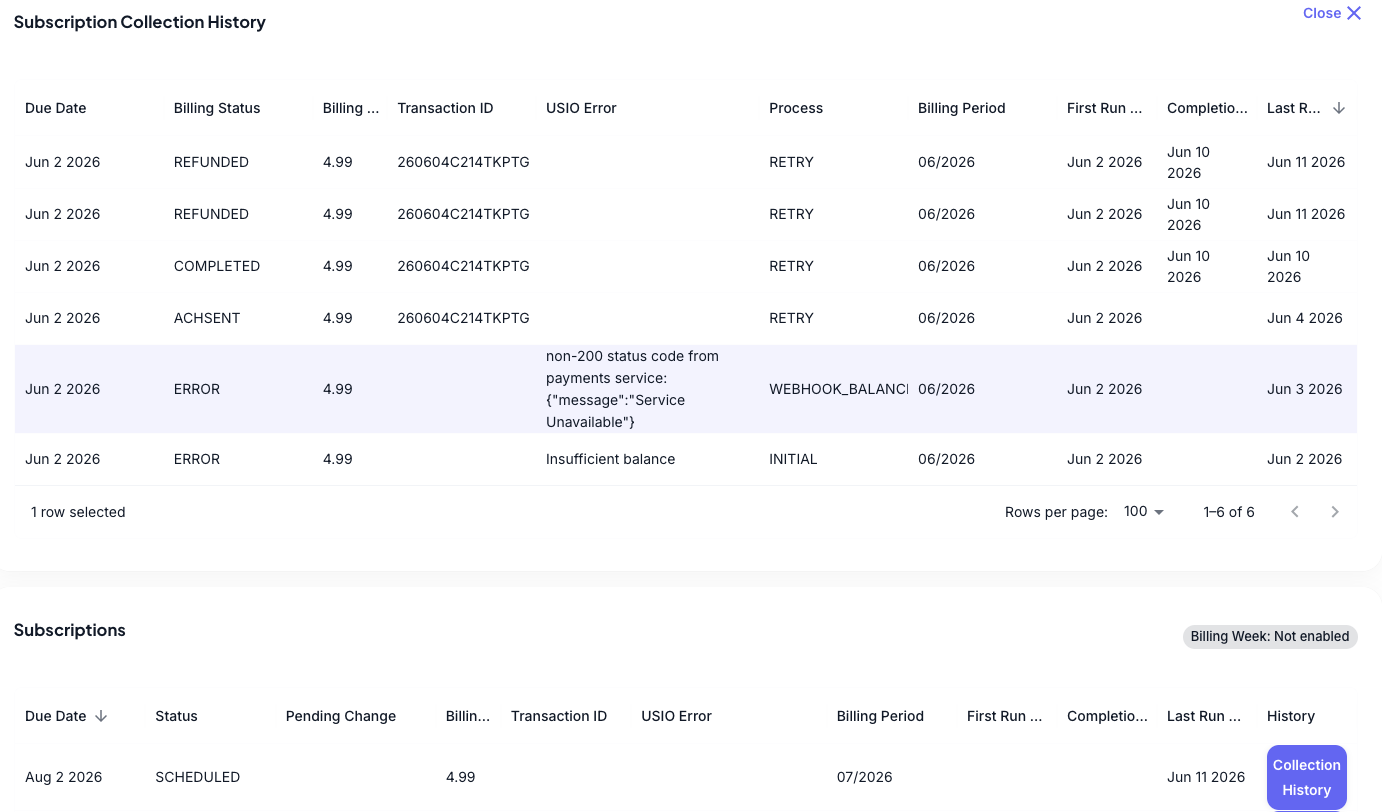
A member’s Subscription Collection History in backoffice shows an
ERRORrow whose USIO Error isnon-200 status code from payments service: {"message":"Service Unavailable"}. -
The same billing period shows more than one collection attempt for the same amount / Transaction ID, with the charge ultimately completing more than once.
-
Reports cluster around periods of USIO timeouts or slowness.
Likely Causes
-
USIO times out (or is slow to respond) on a collection request. Our service exceeds its own timeout/retry limit and retries the transaction, but USIO had already processed the original charge — so the retry lands as a second, duplicate payment. This is the most common cause and tracks with USIO timeout spikes.
Diagnosis
-
Get the initial report — from MX (members reporting a double charge) or from a backoffice observation — then collect the full set of affected users in Hex (next step).
-
Collect the affected users in Hex. Query payments for any user with more than one payment to the same
subscription_idwithin 3–4 days of each other where those payments are inCOMPLETEDstatus. Each such cluster is a duplicate charge; the extraCOMPLETEDpayment(s) beyond the first are what you refund. This bulk query is the authoritative way to gather everyone affected and is what you turn into the input CSV — backoffice is then used only to spot-confirm individual users. -
For each member, open their subscription’s Collection History in backoffice and look for the
ERRORrow with USIO Errornon-200 status code from payments service: {"message":"Service Unavailable"}(see screenshot above). -
Confirm the duplicate: the same billing period and amount completed more than once (the
COMPLETEDrows), beyond the single charge the member owed. -
Build the input CSV (next section) from the Hex results — one row per duplicate (extra)
COMPLETEDpayment. TheCONFIRMATION_IDis that payment’s confirmation / Transaction ID (the Transaction ID column in the Collection History).
Mitigation / Resolution
The remediation script lives at admin-api/scripts/duplicate-payment-refunds/ (main.go, wrapped by main.sh).
It runs in two confirmation-gated phases: (1) refund the duplicate payments, then (2) push each member’s SCHEDULED due date out one month to waive the current cycle.
1. Prerequisites
-
The
admin-apirepo checked out, with Go installed. -
AWS credentials for the production account (the script calls the prod payments and subscription services).
-
Service env vars set in your shell:
-
PAYMENTS_SERVICE_URL(already exported in~/.zshrc). -
SUBSCRIPTIONS_SERVICE_URL— export this if it isn’t already; it is the subscription-service API gateway endpoint. -
PAYMENTS_SERVICE_REGION/SUBSCRIPTIONS_SERVICE_REGIONdefault tous-east-2when unset.
-
-
Your support email, recorded on every refund as an audit field — set
SUPPORT_EMAIL(or pass-support-email). Inmain.sh, setSUPPORT_NAMEandSUPPORT_EMAILto the operator running it.
2. Input CSV format
A header row plus one row per duplicate payment.
Required columns (any order; extra columns are ignored). PAYMENT_AMOUNT is dollars as a decimal string:
PAYMENT_AMOUNT,USER_ID,CONFIRMATION_ID
4.99,5fb24be93f6a96006fb33df3,260605150139U2O
4.99,5fb24be93f6a96006fb33df3,260606025845E0T
4.99,5ffba43d3ca027006f4e7ce5,260602080131YUW-
One row per duplicate payment. A member may appear on multiple rows (one per duplicate
CONFIRMATION_ID); each is refunded independently. -
Exact duplicate
(USER_ID, CONFIRMATION_ID)rows are de-duplicated automatically, so the same payment is never refunded twice. -
CONFIRMATION_IDis the Transaction ID of the duplicate (extra) completed payment from the Collection History.
3. Run the script
-
Point the script at your CSV — either edit the
CSV=default inmain.shor pass it inline — and setSUPPORT_NAME/SUPPORT_EMAILto yourself. -
Dry-run first. This prints both phase plans (counts, dollar totals, and every old → new due date) and submits nothing:
cd admin-api/scripts/duplicate-payment-refunds CSV=/path/to/duplicate_payment_confirmation_ids.csv ./main.sh -dry-run -
Review the plans. When they look right, run for real (drop
-dry-run):CSV=/path/to/duplicate_payment_confirmation_ids.csv ./main.sh -
Phase 1 — Refunds. The script checks each member’s existing refunds first, so already-refunded payments are skipped and a member whose refund lookup fails is skipped (never blind-refunded). It prints the count and dollar total, then asks you to type
yesbefore submitting any refund. -
Phase 2 — Subscription updates. For each member it fetches the current subscription and, only if its status is
SCHEDULED, pushes the due date out one month (waiving the current cycle). Members with no subscription or a non-SCHEDULEDstatus are skipped. It prints every old → new due date, then asks you to typeyesbefore changing any dates.
4. Outputs / audit
The script writes timestamped result CSVs to the working directory, one row per attempted action with a success flag and any error:
-
refund_results_<timestamp>.csvuser_id, confirmation_id, amount, success, error -
subscription_update_results_<timestamp>.csv—user_id, subscription_id, status, old_due_date, new_due_date, success, error
Keep these for the audit trail and to confirm what actually ran.
|
Re-running: refunds are idempotent, the subscription push is not
Phase 1 is safe to re-run — it re-checks existing refunds and won’t refund the same payment twice.
Phase 2 is not: it pushes any still- |
5. Hand off to MX
MX needs to notify every member who was refunded.
From refund_results_<timestamp>.csv, take the rows where success=true, collect those `user_id`s, look up each member’s email (backoffice / users service), and send MX the list of user IDs and emails of all refunded members.
Currently the script doesn’t lookup user emails but this can be done with a user-service lookup.
Escalation
-
The refund-and-waive remediation was directed by Mary Farrow — route any change to the approach (amounts, eligibility, waiving policy) through her.
-
If the double-charging is widespread or ongoing, open an incident huddle — see Open an incident huddle — and pull in the payments service owner.
-
If USIO timeouts are still actively producing duplicate charges, consider pausing collections during the outage — see Turn off Collections — and notify USIO via their Slack channel.
-
Notify the MX team once refunds and waivers are complete and the affected-member list has been handed off.