Rule Engine
The Rule Engine is the core decision-making system that evaluates user eligibility for float and loan products. It executes complex business rules defined in Rulebooks and determines approval status based on user data and rule outcomes.
Concepts & Terminology
Rules
A Rule is an individual eligibility criterion that evaluates a specific aspect of user behavior or account status. Examples:
-
RuleAgeOfAccount: Checks if account is old enough
-
RuleRecurringDeposits: Verifies regular payroll income
-
RuleGoodStanding: Ensures account is in good standing
-
RuleOnTimeFloatPayback: Validates recent payment history
Each rule: * Accepts input from user data, account history, or external services * Evaluates logic based on configured properties * Returns a result: Pass, Fail, or Error * Is idempotent: Same input always produces same output
See Rules Reference for complete rule catalog.
Rulebooks
A Rulebook is a collection of rules applied sequentially to evaluate user eligibility. A rulebook:
-
Contains multiple rules executed in order
-
Has a type: float or loan
-
Has a priority: numeric value for ordering
-
Can be superseding: acts as a "mandatory pass" requirement
-
Has an ApplyTo probability: probabilistic rule application (A/B testing)
Example rulebook flow:
Rulebook: "StringentFloatApproval"
├─ Rule 1: RuleGoodStanding    → PASS
├─ Rule 2: RuleAgeOfAccount (90 days)  → PASS
├─ Rule 3: RuleRecurringDeposits  → PASS
├─ Rule 4: RuleOnTimeFloatPayback  → PASS (all rules passed)
└─ Result: APPROVED
If any rule fails, the entire rulebook fails:
Rulebook: "StandardFloatApproval"
├─ Rule 1: RuleGoodStanding    → PASS
├─ Rule 2: RuleHighTransfer    → FAIL (rule failed)
└─ Result: DENIED (rulebook fails immediately)
Evaluation Results
An EvaluationResult is the outcome of running a rulebook against a user. It includes:
-
Approved status: boolean (true/false)
-
Approved amount: dollar value if approved
-
Deciding rulebook: which rulebook made the final decision
-
Status code: "OK", "NOEVAL", "EVALERR", etc.
-
Rulebook results: array of individual rulebook evaluations
Architecture
Three-Stage Evaluation Pipeline
The rule engine processes user eligibility checks through three distinct stages:
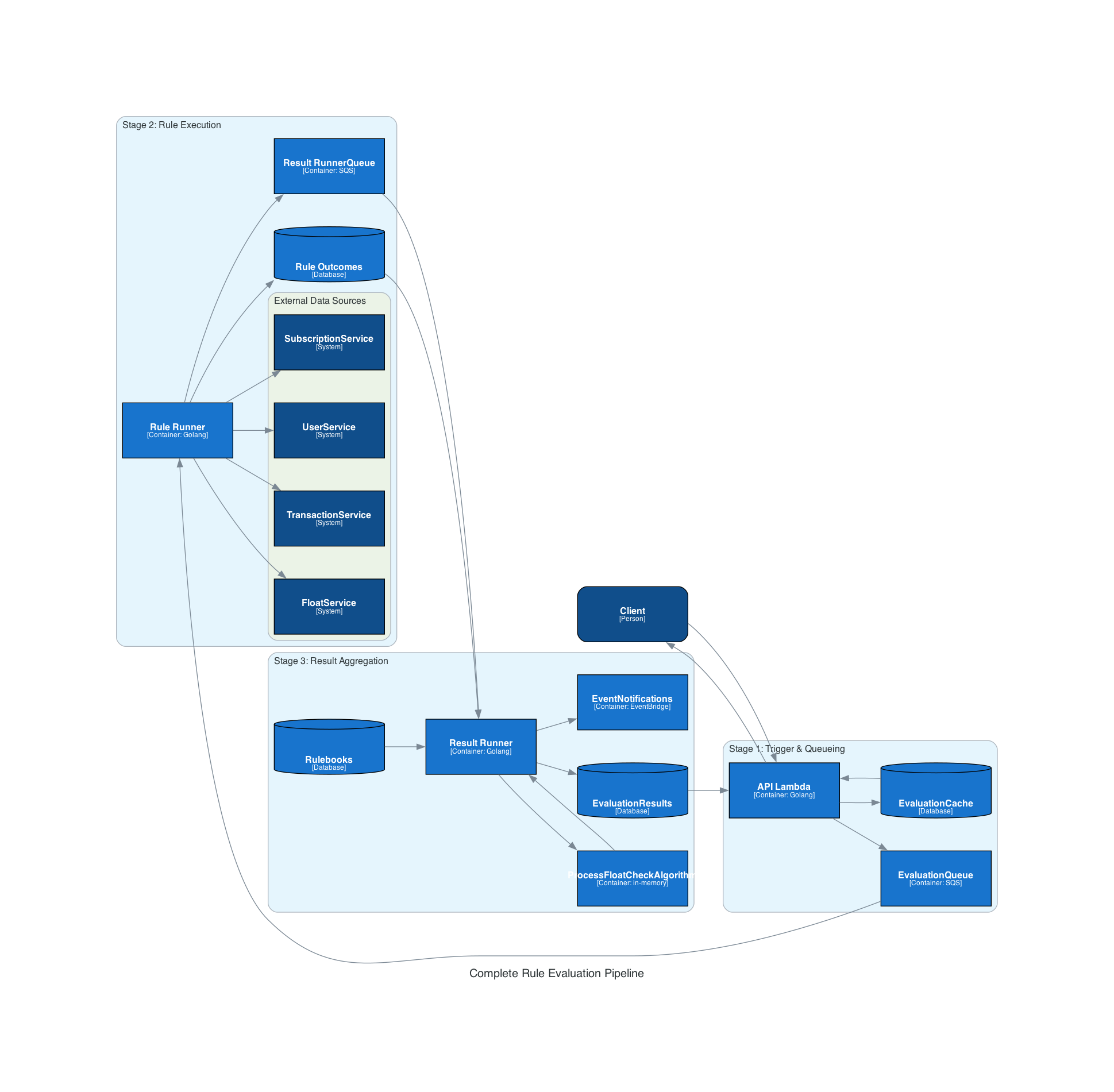
┌──────────────────────────────────────────────────────────────┐
│                         Client Request                       │
└───────────────────────┬──────────────────────────────────────┘
                        │
        ┌───────────────┴─────────────┐
        │                             │
        ▼                             ▼
    [Cached?]                   [New Evaluation?]
        │                             │
        ├─ YES ─→ Return cached       ├─ YES ─→ Queue task (SQS)
        │         result                       │
        │                                      ▼
        │                              ┌──────────────────┐
        │                              │ Rule Runner      │
        │                              │ Lambda           │
        │                              │ ✓ Gather data    │
        │                              │ ✓ Execute rules  │
        │                              │ ✓ Store outcomes │
        │                              └────────┬─────────┘
        │                                       │
        │                                       ▼
        │                              ┌──────────────────┐
        │                              │ Result Runner    │
        │                              │ Lambda           │
        │                              │ ✓ Aggregate      │
        │                              │   outcomes       │
        │                              │ ✓ Apply          │
        │                              │   ProcessCheck   │
        │                              │ ✓ Store result   │
        │                              └────────┬─────────┘
        │                                       │
        └──────────────────┬────────────────────┘
                           │
                           ▼
                    ┌────────────────┐
                    │ Return to      │
                    │ Client         │
                    └────────────────┘
Stage 1: Trigger & Queueing
Client Request (API)
    ↓
API Lambda decides:
  - Immediate eval? (cached result available)
  - Deferred eval? (need background processing)
    ↓
If Deferred:
  Publish task to SQS
    ↓
Rule Runner Lambda triggered
Stage 2: Rule Execution
Rule Runner processes task:
  1. Gather user data from services
  2. Fetch applicable rulebooks
  3. Execute each rule sequentially
  4. Store individual RuleOutcomes
  5. Publish completion event
Stage 3: Result Aggregation
Result Runner aggregates outcomes:
  1. Retrieve all RuleOutcomes for user
  2. Fetch rulebook definitions
  3. Apply ProcessFloatCheck algorithm
  4. Determine final decision
  5. Store EvaluationResult
ProcessFloatCheck Algorithm
The core algorithm that determines final eligibility from multiple rulebook evaluations.
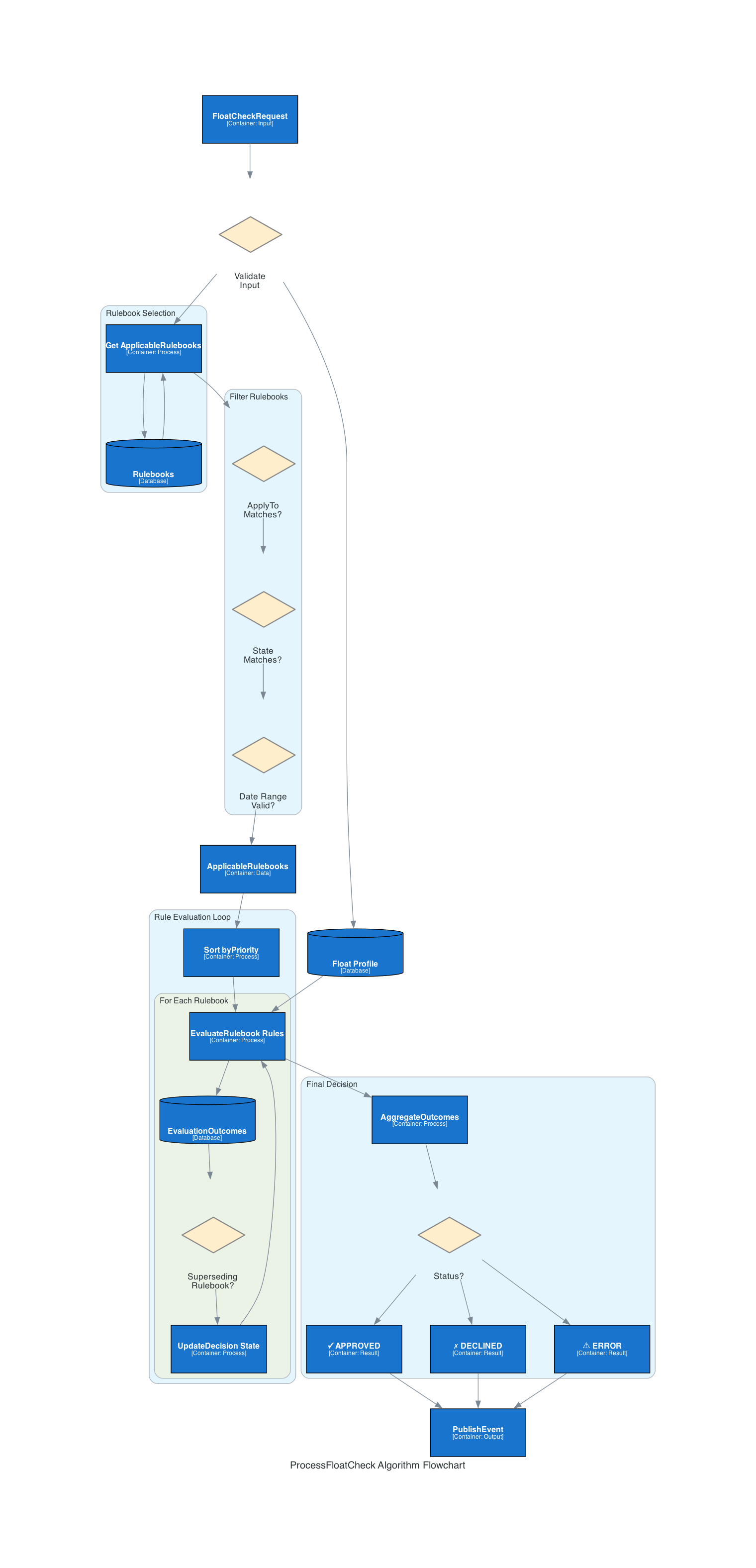
ProcessFloatCheck Algorithm Flow:

┌─────────────────────────────────────┐
│     Input Parameters                │
├─────────────────────────────────────┤
│ • activeRulebooks (map)             │
│ • userEvaluations (array)           │
│ • status (string)                   │
└────────────────┬────────────────────┘
                 │
                 ▼
         ┌──────────────────┐
         │ Evaluations      │
         │ Empty?           │
         └───┬──────────────┘
             │
        ┌────┴─────┐
        │          │
      YES          NO
        │          │
        ▼          ▼
    NOEVAL    ┌──────────────────┐
    Status    │ Filter & Sort:   │
              │ • ApplyTo (A/B)  │
              │ • Priority order │
              └─────────┬────────┘
                        │
                        ▼
              ┌─────────────────────┐
              │ For Each Rulebook   │
              │ (priority order)    │
              └────────┬────────────┘
                       │
        ┌──────────────┴──────────────┐
        │                             │
        ▼                             ▼
   ┌──────────────┐            ┌──────────────┐
   │ Superseding? │            │ Already      │
   └──┬───────────┘            │ Approved?    │
      │                        └──┬───────────┘
      ├─ YES: Check denial        │
      │        ├─ If denied:      ├─ YES: Skip
      │        │  DENY (stop)     │  (unless
      │        └─ If passed:      │   superseding)
      │           Continue to     │
      │           next rulebook   ├─ NO: Eval this
      │                           │ rulebook
      └──────────────────────┬────┘
                             │
                             ▼
                 ┌──────────────────────┐
                 │ Check Status & Eval  │
                 │ - OK: Check Approved │
                 │ - NOEVAL: Continue   │
                 │ - EVALERR: Exit      │
                 └──┬───────────────────┘
                    │
        ┌───────────┴──────────┐
        │                      │
        ▼                      ▼
   [Approved]            [Denied/Error]
        │                      │
        ├─ Regular:            └─ Continue
        │  APPROVED!              to next
        │  (stop loop)
        │
        ├─ Superseding:
        │  Cannot approve
        │  alone, continue
        │
        └─ Continue to next

             ↓

   ┌──────────────────────────┐
   │ Final Decision Result:   │
   ├──────────────────────────┤
   │ • Approved: bool         │
   │ • ApprovedAmount: int    │
   │ • DecidingRulebook: str  │
   │ • Status: string         │
   │ • RulebookResults: []    │
   └──────────────────────────┘
Input:
* activeRulebooks: Map of rulebook definitions
* userEvaluations: Array of rulebook evaluation results
* status: Current processing status
Algorithm:
1. Initialize result as DENIED (Approved = false)

2. Filter evaluations: Remove stale/inapplicable evaluations
   ├─ Check ApplyTo probability (A/B testing)
   ├─ Skip if not applicable
   └─ Keep if applicable

3. Sort by priority: Higher priority = first to evaluate
   Example: Priority 100 evaluated before Priority 50

4. Iterate through sorted evaluations:
   FOR EACH rulebook evaluation IN sorted order:

     a. If already APPROVED:
        └─ Skip unless it's a SUPERSEDING rulebook

     b. Evaluate based on rulebook type:

        Regular Rulebook:
          ├─ If Approved: Mark as decided, Return APPROVED
          ├─ If Denied: Continue to next
          └─ If Error: Return EVALERR status

        Superseding Rulebook:
          ├─ If Approved: Cannot approve alone, Continue
          ├─ If Denied: Override to DENIED, Return DENIED
          └─ If Error: Return EVALERR status

   END FOR

5. Final Decision:
   ├─ If any regular rulebook approved: APPROVED
   ├─ If any superseding rulebook denied: DENIED
   ├─ If no evaluations: NOEVAL
   ├─ If errors exist: EVALERR
   └─ Otherwise: DENIED
Example Execution:
Scenario: User with 3 rulebook evaluations
Rulebooks:
  1. PrimarySuperseding (Priority 100, Superseding=true)
     └─ Approved = false

  2. StringentApproval (Priority 90, Superseding=false)
     └─ Approved = true

  3. StandardApproval (Priority 80, Superseding=false)
     └─ Approved = true

ProcessFloatCheck Execution:
─────────────────────────────

1. Sort by priority:
   [PrimarySuperseding(100), StringentApproval(90), StandardApproval(80)]

2. Evaluate PrimarySuperseding:
   ├─ Result: Denied (not approved)
   ├─ Is Superseding: YES
   ├─ Denied + Superseding: DENY and stop
   └─ Return: APPROVED = false, DecidingRulebook = PrimarySuperseding

Final: DENIED (because superseding rulebook denied)
Another scenario with approval:
Rulebooks:
  1. PrimarySuperseding (Priority 100, Superseding=true)
     └─ Status: OK, Approved = true

  2. StringentApproval (Priority 90, Superseding=false)
     └─ Status: OK, Approved = true

ProcessFloatCheck Execution:
─────────────────────────────

1. Sort by priority:
   [PrimarySuperseding(100), StringentApproval(90)]

2. Evaluate PrimarySuperseding:
   ├─ Result: Approved
   ├─ Is Superseding: YES
   ├─ Cannot approve alone, Continue
   └─ Overall still NOT approved yet

3. Evaluate StringentApproval:
   ├─ Result: Approved
   ├─ Is Superseding: NO
   ├─ Mark as decided
   └─ Return: APPROVED = true, DecidingRulebook = StringentApproval

Final: APPROVED (both primary and regular rulebook approved)
Rulebook Priority & Superseding
Priority System
Rulebooks are evaluated in descending priority order (higher number = earlier evaluation).
Priority System:
├─ Priority 100: Premium/Strictest Criteria
├─ Priority 90: Stringent Criteria
├─ Priority 80: Standard Criteria
├─ Priority 70: Lenient Criteria
└─ Priority 10: Most Lenient Criteria

Example evaluation order for user:
1. Premium rulebook (Priority 100)  - If approves, consider for deciding
2. Stringent rulebook (Priority 90) - Skip if already approved
3. Standard rulebook (Priority 80)  - Can still decide if earlier didn't
Superseding Rulebook (Mandatory Pass)
A superseding rulebook is a mandatory eligibility gate:
-
Must pass for approval regardless of other rulebooks
-
Denial blocks approval even if other rulebooks pass
-
Cannot approve alone: Must have another rulebook approval
Approval Decision Logic:

WITHOUT Superseding:
├─ Approved if ANY regular rulebook approves
└─ Denied if ALL regular rulebooks deny

WITH Superseding Rulebook:
├─ Approved if:
│  ├─ Superseding rulebook PASSES
│  ├─ AND at least one regular rulebook PASSES
│  └─ Result: Use regular rulebook as DecidingRulebook
│
└─ Denied if:
   ├─ Superseding rulebook FAILS (overrides all)
   ├─ OR no other rulebook passes
   └─ Result: Use superseding/regular as DecidingRulebook
Example with superseding requirement:
Scenario: Fraud Detection Rulebook as Superseding

ActiveRulebooks:
├─ FraudDetection (Superseding=true, Priority=100)
│  └─ Rules: RuleMultipleAccounts, RuleSuspiciousHighBalance
│  └─ Status: PASS (not flagged as fraud)
│
└─ RegularApproval (Superseding=false, Priority=80)
   └─ Rules: RuleGoodStanding, RuleAgeOfAccount, RuleRecurringDeposits
   └─ Status: PASS (all criteria met)

Result: APPROVED
├─ Superseding passed ✓
├─ Regular rulebook passed ✓
└─ DecidingRulebook = RegularApproval

vs.

If FraudDetection had FAILED:
└─ Result: DENIED (regardless of RegularApproval status)
A/B Testing Integration
Rulebooks support probabilistic application for A/B testing through the ApplyTo field.
ApplyTo Field:
├─ Value range: 0-10000 (representing 0-100%)
├─ Example: 5000 = 50% application rate
├─ 10000 = 100% application rate
├─ 0 = Never apply

Application Logic:
├─ Generate random number 0-10000
├─ Compare against ApplyTo threshold
├─ If random < ApplyTo: Apply rule
├─ If random >= ApplyTo: Skip rule

Example A/B Test:
├─ Cohort A (Control): StandardApproval rulebook (ApplyTo = 10000)
├─ Cohort B (Test): NewEngineeringRulebook (ApplyTo = 5000)
│  └─ 50% of test users see this, 50% see standard
└─ Measure: Approval rate, default rate differences
Rule Execution Flow
Rule Runner Stage
The Rule Runner Lambda executes individual rules:
-
Data Gathering Phase:
-
Fetch user profile from User Service
-
Retrieve transaction history from Transaction Service
-
Get float/subscription status from Float Service
-
Query ML predictions from Sagemaker (if applicable)
-
-
Rulebook Selection Phase:
-
Filter applicable rulebooks based on user segment
-
Filter by product type (float vs loan)
-
Apply feature flags and experiments
-
-
Rule Execution Phase:
`FOR EACH rule IN selected rulebook: -
Load rule definition with properties
-
Execute rule logic against user data
-
Capture outcome (Pass/Fail/Error)
-
Store RuleOutcome in DynamoDB
-
Continue to next rule
` -
Error Handling:
-
Rule error doesn’t fail entire rulebook (surface error status)
-
Retry logic for transient failures
-
Dead-letter queue for persistent failures
-
Result Runner Stage
The Result Runner Lambda aggregates results:
-
Outcome Retrieval:
`
Query DynamoDB for all RuleOutcomes for user
├─ Filter by timestamp (recent only)
├─ Filter by rulebook type (float/loan)
└─ Collect full array of outcomes
` -
Rulebook Grouping:
`
Group outcomes by RulebookID
├─ RulebookA: [Rule1, Rule2, Rule3]
├─ RulebookB: [Rule1, Rule4]
└─ RulebookC: [Rule5, Rule6]
` -
Rulebook Evaluation:
`FOR EACH rulebook group: -
Check all rules in group
-
If ANY rule failed: Mark rulebook as Failed
-
If ANY rule errored: Mark rulebook as Error
-
If ALL rules passed: Mark rulebook as Passed
-
Calculate approved amount (min of all amount rules)
` -
ProcessFloatCheck Application:
`Call ProcessFloatCheck algorithm with: ├─ All evaluated rulebook results ├─ Active rulebook definitions └─ Current statusProduces final decision: ├─ Approved: bool ├─ ApprovedAmount: int ├─ DecidingRulebook: string ├─ Status: "OK", "NOEVAL", "EVALERR" └─ RulebookResults: object[] ```
-
Persistence & Notification:
`Store EvaluationResult in DynamoDB: ├─ Key: EVAL_RESULTS#{userId} ├─ TTL: configurable (typically 7 days) └─ Status: OK or EVALERRPublish completion event: ├─ Event name: underwriting_user_evaluation_result ├─ Include: UserId, Approved, ApprovedAmount └─ Consumer: Profile service, Analytics ```
Decision Determination Logic
Status Codes
The rule engine returns status codes indicating evaluation state:
| Status | Meaning | Action |
|---|---|---|
OK |
Evaluation successful |
Use Approved + ApprovedAmount |
NOEVAL |
No evaluations found |
No decision can be made |
EVALERR |
Error during evaluation |
Investigation required |
PENDING |
Evaluation in progress |
Cache not yet available |
Approved Amount Determination
When a rulebook approves, it specifies an approved amount (in cents):
Amount Logic:
├─ Multiple rulebooks may approve with different amounts
├─ Final approved amount: MINIMUM of all rule amounts
└─ Ensures conservative approval

Example:
├─ Rulebook A approves: $50
├─ Rulebook B approves: $100
├─ Final approved amount: min($50, $100) = $50
Decision Matrix
Decision Matrix by Rulebook Results:

Regular Rulebook Only:
├─ PASS: APPROVED
├─ FAIL: DENIED
└─ ERROR: EVALERR

Superseding Only:
├─ PASS: Cannot approve (needs regular rulebook)
├─ FAIL: DENIED
└─ ERROR: EVALERR

Superseding + Regular Rulebooks:
├─ Superseding FAIL: DENIED (blocks approval)
├─ Superseding ERROR: EVALERR (blocks decision)
├─ Superseding PASS + Regular PASS: APPROVED
├─ Superseding PASS + Regular FAIL: DENIED
├─ Superseding PASS + Regular ERROR: EVALERR
└─ No evaluations: NOEVAL
Examples
Example 1: Simple Approval
Scenario: First-time user applying for float

Request: GET /v1/user123/eligibility-check

Rule Execution (Rule Runner):
├─ RuleGoodStanding: PASS (account active)
├─ RuleAgeOfAccount (30 days): PASS (account is 45 days old)
├─ RuleRecurringDeposits: PASS (2 paycheck deposits)
├─ RuleBalanceRequirement: PASS (balance >= $50)
└─ RuleValidDebitCard: PASS (debit card on file)

All rules PASSED ✓

Result Aggregation (Result Runner):
├─ Rulebook: StandardApproval
├─ Status: PASSED
├─ Approved Amount: $50 (minimum across eligible rules)
│
└─ ProcessFloatCheck:
   ├─ Input: 1 rulebook (StandardApproval, Approved=true)
   ├─ Sort by priority: [StandardApproval]
   ├─ Evaluate: StandardApproval PASSES
   └─ Output: APPROVED = true, ApprovedAmount = 5000 (in cents)

Final Decision: APPROVED for $50
Example 2: Denial by Superseding Rulebook
Scenario: User with multiple linked accounts (fraud signal)

Rule Execution:

Rulebook 1: FraudDetectionSuperseding (Superseding=true)
├─ RuleMultipleAccounts: FAIL (5 linked accounts, max 2)
└─ Rulebook Status: FAILED

Rulebook 2: StandardApproval (Superseding=false)
├─ RuleGoodStanding: PASS
├─ RuleAgeOfAccount: PASS
├─ RuleRecurringDeposits: PASS
├─ RuleBalanceRequirement: PASS
└─ Rulebook Status: PASSED (all rules passed)

Result Aggregation:

ProcessFloatCheck Algorithm:
├─ Sort by priority:
│  [FraudDetectionSuperseding(100), StandardApproval(90)]
├─
│ Evaluate FraudDetectionSuperseding:
│  ├─ Result: FAILED
│  ├─ Is Superseding: YES
│  ├─ Action: DENY and stop (superseding blocks all)
│  └─ Override final decision
│
└─ StandardApproval: SKIPPED (superseding blocked evaluation)

Final Decision: DENIED (superseding rulebook denial blocks approval)
Example 3: Multiple Regular Rulebooks
Scenario: User with multiple rulebooks active (experiment)

Rulebook Results:
├─ StringentApproval (Priority 90): FAILED
│  └─ RuleOnTimeFloatPayback: FAILED (recent late payment)
│
├─ StandardApproval (Priority 80): PASSED
│  ├─ RuleGoodStanding: PASS
│  ├─ RuleRecurringDeposits: PASS
│  ├─ RuleBalanceRequirement: PASS
│  └─ Approved Amount: $50
│
└─ LenientApproval (Priority 70): PASSED
   ├─ RuleAgeOfAccount (7 days): PASS
   ├─ RuleRecurringDeposits: PASS
   └─ Approved Amount: $30

ProcessFloatCheck:
├─ Sort: [StringentApproval(90), StandardApproval(80), LenientApproval(70)]
├─
│ Evaluate StringentApproval:
│  └─ FAILED, Continue to next
│
│ Evaluate StandardApproval:
│  ├─ PASSED
│  ├─ Mark as decided
│  ├─ ApprovedAmount = $50 (from deciding rulebook)
│  └─ APPROVED, Done
│
└─ LenientApproval: SKIPPED (already approved by higher priority)

Final Decision: APPROVED for $50 (StandardApproval decided)
Configuration & Extensibility
Rulebook YAML Configuration
Rulebooks are defined in YAML with structure:
rulebooks:
  - id: "standard_approval"
    type: "float"
    priority: 80
    superseding: false
    apply_to: 10000  # 100% application
    rules:
      - id: "good_standing"
        properties: {}
      - id: "age_of_account"
        properties:
          min_age: 30  # days
      - id: "recurring_deposits"
        properties:
          min_income: 10000  # cents
Custom Rule Creation
To create a new rule:
-
Implement
Ruleinterface inpkg/rules/ -
Define properties struct
-
Implement evaluation logic
-
Add corresponding test file
-
Register rulebook in YAML configuration
See Rules Reference for complete list of available rules.
See Also
-
System Architecture - Overall system design
-
Rules Reference - Complete rule catalog
-
Rulebooks - Rulebook configuration and management
-
Lambda Functions - Rule Runner and Result Runner implementation
-
Payback Predictor V2 - ML model that can override this pipeline’s decision
-
DynamoDB Schema - Rule outcome and evaluation storage